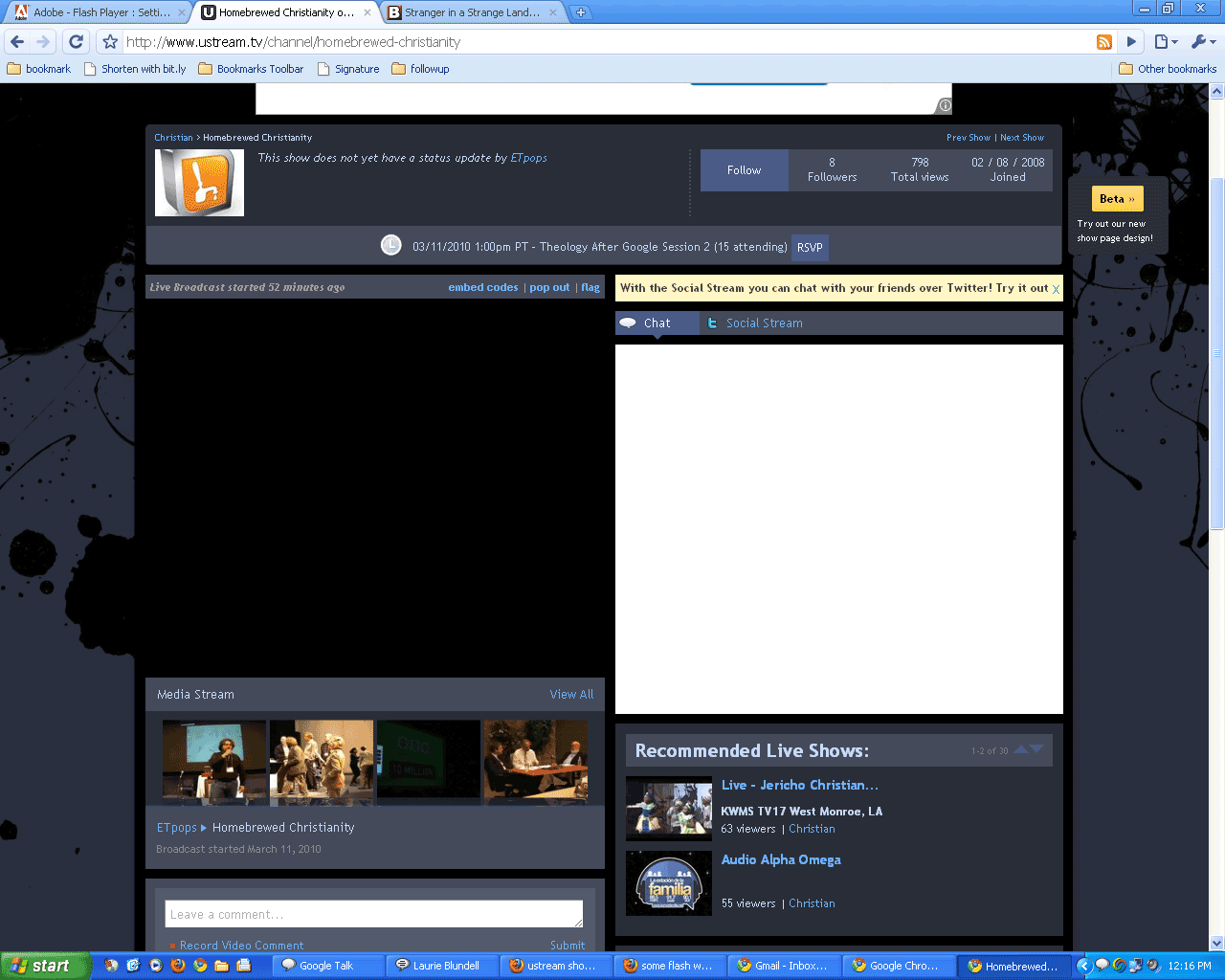
While trying to watch a conference via Ustream, I found a horrible discovery — the site would no longer load video.
I tried Internet Explorer (IE8), Firefox and Chrome. Nothing.
After numerous Google searches, I was still out of luck.
No video on the site would load.
YouTube worked. Vimeo worked. Facebook video worked.
But no Ustream. Nothing but a black box appeared in place of the video.
To cut to the chase, I figured it had to be something with the Flash plugin. So I reinstalled it.
Still nothing!
Finally, I remembered a little known settings page for Flash:
http://www.macromedia.com/support/
documentation/en/flashplayer/help/settings_manager04.html
There’s a setting on the 2nd tab that makes all the difference.
On the Global Storage Settings tab, be sure that “Allow third-party Flash content to store data on your computer.” is clicked.
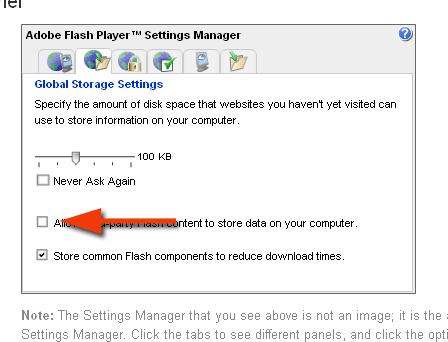
If it was unchecked, click it, then click to another tab to “save it” and then refresh your Ustream.tv page.
Viola! Hopefully that should be your fix.
If this doesn’t fix your problem, Ustream offers very limited help files but suggests you check your firewall settings if you’re still not getting video.

Man, you sure saved me countless minutes trying to troubleshoot this one! Just last week, when I was running some spyware/malware checks to be sure my system was up to snuff, I disabled all the non-critical (I thought) Flash stuff in both Firefox and Chrome. Like you said, nothing in the Google searches — until your post showed up. Thanks! (Double-thanks!)
Glad I could help!
Digite seu comentário aqui.Thank you, for months I'm looking for a help on several site even on ustream and no help, but you really went straight on the set!
So glad I could help!
Once again, I was seething to the brim with frustration until I somehow found this fix.
Although, I’m not terribly comfortable with this “third party data” being stored on my computer. Do you know if there’s a way to routinely clean it out?
Derv, glad to help with your issue. However I don’t know of any sure fire way off hand to clean the data out. I don’t know if it’s storing cookies or something different.
I routinely clean my cookies and such but again, I’m not sure what type of information is being stored.
Thanks!! After hours of frustration searching for a solution, you solved the problem!
Finally, the answer to my frustrations! Thank you!!!!
Cool! YouTube worked. Vimeo worked. Facebook video worked.
Excellent! Glad it worked!
I can’t get the global setting box to accept my command for Adobe Flash Player in Windows 7 …I click the box to allow global setting but the box won’t check and if I click a different tab it still stays unchecked.. and I still can’t get ustream….any ideas. I tried safe mode but it won’t let me go to the website. It is checked on the other pc in the house that is wirelessy attached to this pc and that one is getting ustream
I don’t have any machines running Windows 7, so I’m not familiar with how the settings might differ from Windows XP (if they do). You might make sure you have the latest version of Adobe Flash installed (http://get.adobe.com/flashplayer/). Otherwise I’m not too sure. Perhaps someone else will have an idea or solution.
You might also check to see what size your storage settings are set to. Perhaps it’s set to low so you can’t enable saving data to your computer.
Or check these settings as suggested by another commenter.
http://taylorwebstuff.wordpress.com/2010/03/22/ustream-tv-youtube-video-solving-a-few-internet-tv-mysteries/
Thank you – this worked for me!
Awesome advise I have fought my computer for a week trying to figure out why I could not stream live video. Thank you ,Thank you ,Thank you!!
wow thanks so much for this post.. I only wish I had remembered last week when optimizing things that I had changed this setting for some reason as well.. You literally saved my ability to do my job today as we were required to watch a webcast on ustream and I was seeing black
Thank you so much! This is the only troubleshooting step that actually worked.. spent a lot of time and this one actually worked!
Thank You!
This has been driving me crazy for three weeks and NOBODY has been able to help! It was the ONLY setting I didn’t try, THANK YOU, THANK YOU, THANK YOU!!!! You saved my sanity!!!
So glad I could help you out!
I tried your suggestions it still does not work. Youtube and the other sites work. I see you had a black box where the video is suppose to be, I on the other hand have a complete white screen when I use ustream and others have the same problem. Is there a fix for the white screen with ustream.
Sorry. I haven’t come across that problem – or found a solution.
I have this problem and I did what’s on above checking the third party thing and I still have black screen and nothing showing on my live stream. Is it because I don’t have webcam plug-in? I just want to stream on my games that’s all.
If you’re wanting to broadcast your games on Ustream – you’ll need software to do that. This fix is only about viewing Ustream videos.
Hi. Thanks for your link, but it didn’t work for me. The box was already checked. I unchecked it and re-checked it – still no change. Do you have any other suggestions?
Note: I, too, get the black screen with the ever-dreaded loading circle. Yet, YouTube and everything else functions just fine. My Flash is up-to-date and I use Google Chrome as my browser.
Thanks in advance.
Sorry the solution didn’t work. I’m not a Ustream expert – I just found a solution to my problem.
It sounds like perhaps you’re not getting a good connection to Ustream if you’re seeing the loading circle at least.
You might try uninstalling Chrome and reinstalling it. Otherwise I’m not sure.
In Windows 7 with Flash Player 11, go to control panel, click on flash player to open up the settings dialog.
Make sure either “Allow sites to save information on this computer” or “Ask me before allowing new sites to save information on this computer” is checked.
Then click the “Local Storage Settings by Site” button, and add “Ustream.com” to the list for allow. It should load up the video then. I missed an entire webinar that I waited for a long time to see because of this setting.
Hello, I’m having the exact same problem, just a black screen without even a LIVE sign. I can follow the conversation/chat though. Problem is, the global storage setting already set to allow third-party flash content to store data… so, where does it go wrong?
Flash & browser are updated. Please help?
Sorry. I don’t have any ideas outside of what I’ve suggested.
I had the same problem, in both Firefox and Explorer, and found that the solution above didn’t work for me – the box was already checked. What did work for me, although I’m not sure what aspect actually worked, was to turn off my antivirus, reinstall the updated Flashplayer, turn antivirus back on, and reboot. I believe I tried after the reinstall and before the reboot, and it still didn’t work. It’s also possible that something else I did in the meantime fixed it, but the reboot seemed to be needed.
HI I’m having this very problem right now but when I copy and paste the link all the info is there but the actual manager you display on here is not there. Please help
The manager may have been updated since I posted this originally – or you may not have Flash installed. You’ll need Flash in order to view the manager.
I have the same issue. IE, Chrome, Firefox. No Ustream and ONLY FROM USTREAM, No video. I checked all my global settings. reinstalled flash. STILL NOTHING?
Someone, please help.
i am having the same problem but this fix is outdated, can you help?
Sorry. I only know what fixed the issue I had.